Kits
In AdvancedFFA, kits are flexible and player-centric. While server admins define the default loadout, players have complete freedom to rearrange their hotbar, offhand, and inventory slots to match their personal playstyle.
Creating a Kit
To create a kit:
- Register the kit:
/ffa kit create nodebuff - Equip the loadout:
- Put all armor, offhand items, weapons, potions, and food into your player inventory.
- Save the inventory:
/ffa kit edit nodebuff setInv
To view all kits:
/ffa kit list
# Output: Kits(2): nodebuff, gapple
Inspecting Kit Details (/ffa kit info)
Need to check what items or potion effects a kit has without opening files? Run:
/ffa kit info <kitname>This prints a complete diagnostic overview in chat:
- Kit ID & Display Name
- Queue & Layout Editing Status
- Regen On Kill & Required Permission
- Linked Arenas
- Equipped Armor & Offhand item
- Inventory Contents Summary (e.g.
32x Golden Apple, 1x Diamond Sword) - Active Potion Effects (effect type, amplifier, duration)
The Interactive Kit Editor (/kitedit)
Players can customize their layout by typing:
/kitedit <kitname>This opens the interactive layout editor GUI:
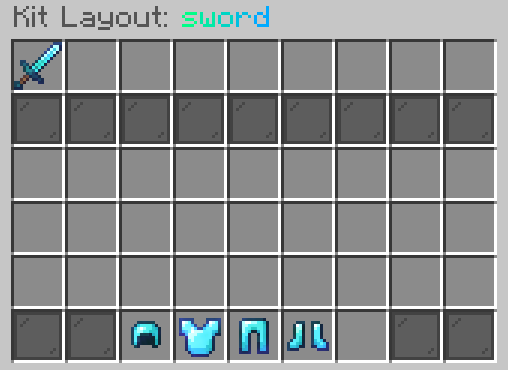
Editor Mechanics
- Hotbar (Slots 0 – 8): Arrange primary weapons, pearls, and healing potions.
- Main Inventory (Slots 18 – 44): Place extra potions, backup food, and blocks.
- Armor Slots (Slots 47 – 50): Fixed view of the kit armor.
- Offhand (Slot 51): Configure offhand shield, totem, or pearls.
- Auto-Save: When the player closes the GUI, their customized slot mapping is automatically saved to SQLite and applied whenever they join an arena.
Kit Customization Options
Allow / Disallow Layout Editing
If you run a ranked or tournament kit where every player must use identical slot placement:
/ffa kit edit <kitname> allowEdit falseKill Regeneration (regenOnKill)
When enabled, eliminating an opponent immediately heals the player to full health and refreshes all kit items and potions:
/ffa kit edit <kitname> regenOnKill trueKit Permission
Restrict special kits to VIPs or donors:
/ffa kit edit <kitname> setPermission server.kit.vip(To remove the permission requirement, use /ffa kit edit <kitname> setPermission none).
Potion Effects
You can assign permanent or timed potion effects to any kit:
- List active effects:
/ffa kit edit <kitname> potionEffects list - Add an effect:
# Format: /ffa kit edit <kitname> potionEffects add <effect> [durationSeconds|infinite] [level] /ffa kit edit gapple potionEffects add speed infinite 2 /ffa kit edit gapple potionEffects add resistance infinite 1 /ffa kit edit archer potionEffects add speed 60 1 - Remove an effect:
/ffa kit edit gapple potionEffects remove speed